InterVLAN Questions
Question 1
Check the topology below <Redraw,Router:Fa0/0 -> Change Fa0/1;Sw1,2:Fa0/24->Fa0/1;192.168.1.0 changes to 10.1.1.0/24;VLAN changes to 15,20>
In this topology, interVLAN routing is configured. What two statements are correct? (Choose two)
A. Subinterfaces must be configured on Fa0/1 of Router
B. On Sw2, the default gateway must be set
C. The interfaces connecting between Router and Sw2 must be configured using same encapsulation type
D. Hosts in VLAN 15 and VLAN 20 can communicate with each other without using the Router
E. The main interface Fa0/0 of the Router must be assigned an IP address
Answer: A C
Question 5
Refer to the topology below <Redraw>
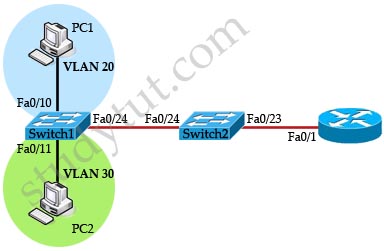 The Router and two 2960 switches have been configured properly. Which command should be used on Fa0/24 on the two switches so that PC1 in VLAN 20 can communicate with PC2 in VLAN 30?
A. No further configuration is required
B. Switch1(config-if)#switchport mode trunk
C. Switch1(config-if)#switchport mode access
D. Switch1(config-if)#switchport encapsulation dot1q
Answer: B
Question 7
Check the following topology.
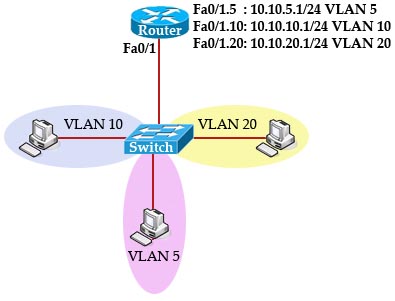
A switch is configured with some VLANs. All the hosts on this switch have been configured with suitable default gateway. A router is directly connected to the switch and is configured as a “router-on-a-stick”. All subinterfaces are configured correctly and the main interface was turned on. IP routing is also enabled. What commands should be configured on the router?
A.
Router(config)#router ospf 100
Router(config-if)# network 10.10.0.0 0.0.255.255 area 0
B.
Router(config)#router eigrp 100
Router(config-if)# network 10.10.0.0 0.0.255.255
C. The configuration was good. No commands need to be added
D.
Router(config)#ip route 0.0.0.0 0.0.0.0 10.10.5.1
Answer: C
Question 8
Check the following topology
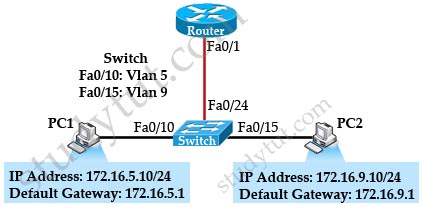 What commands should be used on the Switch and Router to allow PC1 and PC2 to communicate? (Choose two)
A.
Router(config)#interface fa0/1
Router(config-if)#ip address 10.0.0.1 255.255.255.0
Router(config-if)#no shutdown
B.
Router(config)#interface fa0/1
Router(config-if)#no shutdown
Router(config-if)#interface fa0/1.5
Router(config-if)#encapsulation dot1q 5
Router(config-if)#ip address 172.16.5.1 255.255.255.0
Router(config-if)#interface fa0/1.9
Router(config-if)#encapsulation dot1q 9
Router(config-if)#ip address 172.16.9.1 255.255.255.0
C.
Router(config)#interface fa0/1
Router(config-if)#no ip address
Router(config-if)#no shutdown
D.
Router(config)#ip route 0.0.0.0 0.0.0.0 172.16.5.1
Router(config)#ip route 0.0.0.0 0.0.0.0 172.16.9.1 2
E.
Router(config)#router ospf 1
Router(config-router)#network 172.16.5.0 0.0.0.255 area 0
Router(config-router)#network 172.16.9.0 0.0.0.255 area 0
F.
Switch(config)#interface fa0/24
Switch(config-if)#switchport mode trunk
G.
Switch(config)#interface fa0/24
Switch(config)#switchport mode access
Answer: B F
Question 9
Your company has five different VLANs and they need to communicate with each other but your router only has two interfaces left. How will you complete this task using the fewest physical interfaces on the router?
A. Add three more interfaces
B. Add another router to handle other VLANs
C. Add a switch and connect all five VLANs to this switch, then connect an interface on this switch to an interface on the router
D. Use the router-on-a-stick configuration
Answer: D