EtherChannel
Question 1
Refer to the topology below

A technician is trying to configure EtherChannel on two switches. The following command have been configured on Switch1:
interface range Fa0/23 – 24
switchport trunk encapsulation dot1q
switchport mode trunk
channel-group 1 mode auto
What commands should be issued on Switch2 so that it can form an EtherChannel link with Switch1?
A.
interface range fa0/23 – 24
switchport trunk encapsulation dot1q
switchport mode trunk
channel-group 1 mode active
B.
interface range fa0/23 – 24
switchport trunk encapsulation dot1q
switchport mode trunk
channel-group 1 mode auto
C.
interface range fa0/23 – 24
switchport trunk encapsulation dot1q
switchport mode trunk
channel-group 1 mode desirable
D.
interface range fa0/23 – 24
switchport trunk encapsulation dot1q
switchport mode trunk
channel-group 1 mode passive
Answer: C
Explanation
From the configuration of Switch1, we see it is using Port Aggregation Protocol (PAgP) with “auto” mode so the other end (Switch2) must also runs PAgP with “desirable” mode to actively sending request to form an Etherchannel.
Question 2
A technician is trying to configure EtherChannel on two switches via Fa0/23 and Fa0/24 but the EtherChannel is not formed. The output of the “show interface fa0/23” commands are shown below. What is the problem?
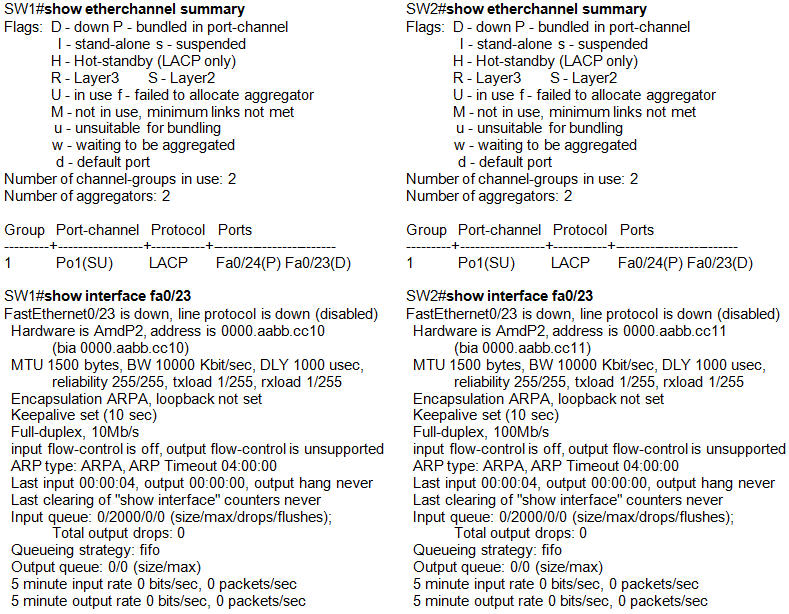
A. Both Fa0/23 interfaces are turned off
B. Their MAC addresses are mismatched
C. Their speeds are mismatched
D. Their encapsulations are mismatched
Answer: C
Explanation
All interfaces in an EtherChannel must be configured identically to form an EtherChannel. Specific settings that must be identical include:
+ Speed settings
+ Duplex settings
+ STP settings
+ VLAN membership (for access ports)
+ Native VLAN (for trunk ports)
+ Allowed VLANs (for trunk ports)
+ Trunking Encapsulation (ISL or 802.1Q, for trunk ports)
In the output of the “show interface fa0/23” commands we see the speed of interface Fa0/23 of SW1 is “100Mb/s” while that of SW2 is “10Mb/s” so the speed is mismatched here -> an Etherchannel will not be formed.
Question 3
A technician is configuring a Layer 3 EtherChannel by grouping two interfaces into channel group 10. Now he needs to assign an IP address for this EtherChannel. Which interface should he assign the IP address?
A. The port-channel 10 interface
B. Any member interface
C. The highest port number in the member interfaces
D. The lowest port number in the member interfaces
Answer: A
Explanation
When an EtherChannel is created, a logical interface will be created on the switches or routers representing for that EtherChannel. You can configure this logical interface in the way you want. For example, assign access/trunk mode on switches or assign IP address for the logical interface on routers… An example of a Layer 3 Etherchannel port is shown below:
| interface PortChannel1 description Link to R2 ip address 10.2.4.13 255.255.255.252 |
Question 4
A technician is configuring EtherChannel port. What parameter can be set differently on member ports?
A. Speed settings
B. Duplex settings
C. Native VLAN
D. Allowed VLANs
E. DTP settings of negotiation
Answer: E
Explanation
All interfaces in an EtherChannel must be configured identically to form an EtherChannel. Specific settings that must be identical include:
+ Speed settings
+ Duplex settings
+ STP settings
+ VLAN membership (for access ports)
+ Native VLAN (for trunk ports)
+ Allowed VLANs (for trunk ports)
+ Trunking Encapsulation (ISL or 802.1Q, for trunk ports)
-> DTP settings of negotiation can be different on ports within an EtherChannel.
Question 5
You are a new employee. The following output is shown when you are checking EtherChannel on a switch. What commands was issued on Fa0/1 to create such output?

<Redraw-Change to Fa0/1;channel-group 20>
A. interface Fa0/1
channel-group 10 mode auto
switchport trunk encapsulation dot1q
switchport mode trunk
B. interface Fa0/1
channel-group 20 mode auto
switchport trunk encapsulation dot1q
switchport mode trunk
C. interface Fa0/1
channel-group 20 mode passive
switchport trunk encapsulation dot1q
switchport mode trunk
D. interface Fa0/1
channel-group 20 mode desirable
switchport trunk encapsulation dot1q
switchport mode trunk
E. interface Fa0/1
channel-group 10 mode passive
switchport trunk encapsulation dot1q
switchport mode access
Answer: C
Explanation
From the output we see these lines:
+ Port-channel = Po20 -> must use the command “channel-group 20 …”
+ Mode = Passive -> must set the mode to passive.
+ Protocol = LACP -> In fact, from the “passive” mode we have already learned it is running LACP.
Therefore the correct command should be “channel-group 20 mode passive”.