Frame Relay
Question 1
What does the line “PVC STATUS = INACTIVE” mean in the “show frame-relay pvc” command?
A. There is a problem on the remote end of the PVC
B. There is a problem on the local end of the PVC
C. The interface which is configured with Frame Relay is shutdown
D. The PVC is waiting for the hello message from the remote end
E. The PVC is sending hello message but it does not receive response from remote end
Answer: A
Explanation
The PVC STATUS displays the status of the PVC. The DCE device creates and sends the report to the DTE devices. There are 4 statuses:
+ ACTIVE: the PVC is operational and can transmit data
+ INACTIVE: the connection from the local router to the switch is working, but the connection to the remote router is not available
+ DELETED: the PVC is not present and no LMI information is being received from the Frame Relay switch
+ STATIC: the Local Management Interface (LMI) mechanism on the interface is disabled (by using the “no keepalive” command). This status is rarely seen so it is ignored in some books.
Question 2
Which of the following commands check the encapsulation type for a frame relay connection?
A. show ip interface
B. show frame-relay lmi
C. show frame-relay pvc
D. show frame-relay map
E. show interfaces
F. show frame-relay status
Answer: D
Explanation
The “show frame-relay map” command displays the current map entries and information about the connections, including encapsulation type.
You can check Table 33 in the following link: http://www.cisco.com/en/US/docs/ios/12_2/wan/command/reference/wrffr4.html#wp1029343
It clearly states there is a Field which can be Cisco or IETF, which indicates “the encapsulation type” for the frame relay connection. We quote Table 33 here for your quick reference (you will see what we want to imply in bold):
| Field | Description |
| Serial 1 (administratively down) | Identifies a Frame Relay interface and its status (up or down). |
| ip 131.108.177.177 | Destination IP address. |
| dlci 177 (0xB1,0x2C10) | DLCI that identifies the logical connection being used to reach this interface. This value is displayed in three ways: its decimal value (177), its hexadecimal value (0xB1), and its value as it would appear on the wire (0x2C10). |
| static | Indicates whether this is a static or dynamic entry. |
| CISCO | Indicates the encapsulation type for this map; either CISCO or IETF. |
| TCP/IP Header Compression (inherited), passive (inherited) | Indicates whether the TCP/IP header compression characteristics were inherited from the interface or were explicitly configured for the IP map. |
The “show frame-relay lmi” gives us information about the LMI encapsulation type used by the Frame Relay interface, which can be ANSI, CISCO or Q933a.
Question 3
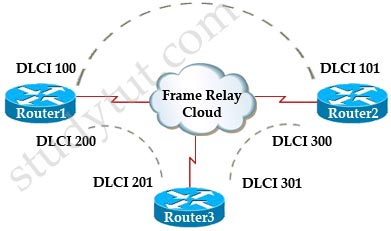
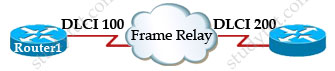
A colleague shows you a topology and asks what is the meaning of DLCI 200 in this case?
A. It is the identifier of the PVC for both ends
B. It is a Layer 2 address used by Router1 to describe a PVC to Router3
C. B. It is a Layer 2 address used by Router3 to describe a PVC to Router1
D. It is a Layer 3 address used by the Router1 to describe a PVC to Router3
E. It is a random number that is shared among the frame-relay router in the network
Answer: B
Explanation
DLCI stands for Data Link Connection Identifier. DLCI values are used on Frame Relay interfaces to distinguish between different virtual circuits. DLCIs have local significance because the identifier references the point between the local router and the local Frame Relay switch to which the DLCI is connected.
Question 4
Check the output of the “show frame-relay pvc” command below.
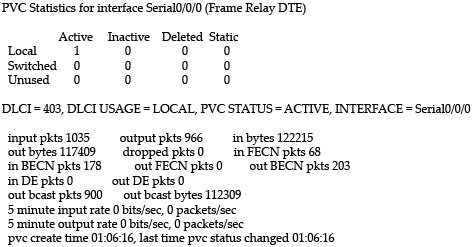
What parameter in the output of the “show frame relay pvc” command indicates that traffic sent to the local router is congested?
A. in FECN pkts 68
B. in BECN pkts 203
C. PVC STATUS = ACTIVE
D. DE pkts 0
Answer: B
Explanation
First we should grasp the concept of BECN & FECN through an example:
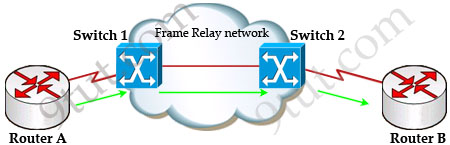
Suppose Router A wants to send data to Router B through a Frame Relay network. If the network is congested, Switch 1 (a DCE device) will set the FECN bit value of that frame to 1, indicating that frame experienced congestion in the path from source to destination. This frame is forwarded to Switch 2 and to Router B (with the FECN bit = 1).
Switch 1 knows that the network is congesting so it also sends frames back to Router A with BECN bit set to 1 to inform that path through the network is congested.
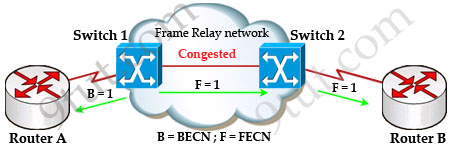
In general, BECN is used on frames traveling away from the congested area to warn source devices that congestion has occurred on that path while FECN is used to alert receiving devices if the frame experiences congestion.
BECN also informs the transmitting devices to slow down the traffic a bit until the network returns to normal state.
The question asks what “indicates that traffic sent to the local router is congested” which means it asks about the returned parameter which indicates congestion -> BECN.
Question 5
What will happen in a Frame Relay circuit if the Committed information rate (CIR) is exceeded?
A. All exceeded data is dropped
B. All exceeded data is marked discard eligible
C. Only exceeded UDP data is dropped while exceeded TCP data is allowed to go through
D. The frame relay device sends back a BECN message to warning the sending device to reduce the transmission speed
Answer: B
Explanation
Committed information rate (CIR): The minimum guaranteed data transfer rate agreed to by the Frame Relay switch. Frames that are sent in excess of the CIR are marked as discard eligible (DE) which means they can be dropped if the congestion occurs within the Frame Relay network.
Note: In the Frame Relay frame format, there is a bit called Discard eligible (DE) bit that is used to identify frames that are first to be dropped when the CIR is exceeded.
Question 6
Which of the following commands can be used to find out the DLCI destination address in a Frame Relay connection?
A. show frame-relay pvc
B. show frame-relay lmi
C. show frame-relay map
D. show frame-relay point-to-point
E. show ip frame-relay
Answer: C
Question 7
 R1 cannot communicate with R2. What is wrong with the below configuration:
| R1#show running-config interface Serial1/0 bandwidth 52 ip address 192.168.10.2 255.255.255.0 encapsulation frame-relay frame-relay map ip 192.168.10.2 100 broadcast |
A. wrong frame-relay map statement
B. wrong IP address
C. wrong bandwidth
D. wrong encapsulation type
Answer: A
Explanation
The IP address in the “frame-relay map ip …” command should be the IP address of the next-hop frame-relay router, not the local one.
Question 8
Check the output of the “show frame-relay map” below. A colleague asks you what the word “dynamic” here means. What will you answer here?
| R1#show frame-relay map Serial1/0/0(up): ip 192.168.1.1 dlci 403(0x193,0x6430), dynamic broadcast, status defined, active |
A. The IP address 192.168.1.1 was learned dynamically
B. The DLCI 403 was generated dynamically
C. The mapping between DLCI 403 and IP address 192.168.1.1 was learned dynamically via Inverse ARP
D. Both the IP address and DLCI number were learned dynamically from remote router
Answer: C
Explanation
The term dynamic indicates that the DLCI number and the remote router IP address 192.168.1.1 are learned via the Inverse ARP process.
Inverse ARP is a technique by which dynamic mappings are constructed in a network, allowing a device such as a router to locate the logical network address and associate it with a permanent virtual circuit (PVC).
Question 9
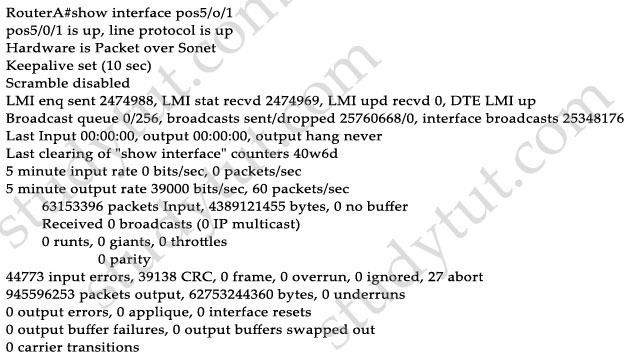
Check the output of the “show interface pos5/0/1” command. Which WAN technology is running on this interface?
A. PPP
B. Frame-relay
C. HDLC
D. TDM
E. ISDN
Answer: B
Explanation
Local Management Interface (LMI) is a signaling standard protocol used between your router (DTE) and the first Frame Relay switch. From the output we learn this interface is sending and receiving LMI messages -> Frame Relay is being used.
Question 10
What does the “broadcast” keyword in the “frame-relay map ip 192.168.100.1 100 broadcast” command mean?
A. The IP address 192.168.100.1 should be broadcasted to all Frame Relay devices at the other ends
B. The DLCI 100 should be broadcasted to all Frame Relay devices at the other ends
C. The broadcast keyword allows routing updates,such as RIP, EIGRP, OSPF, to be forwarded on the PVC
D. The mapping between IP address 192.168.100.1 and DLCI 100 will be advertised to all other Frame Relay devices
Answer: C
Explanation
The command frame-relay map ip 192.168.100.1 100 broadcast means to mapping the distal IP 192.168.100.1 to the local DLCI 100. When the “broadcast” keyword is included, it turns Frame Relay network as a broadcast network, which can forward broadcasts.