OSPF Questions
Question 1
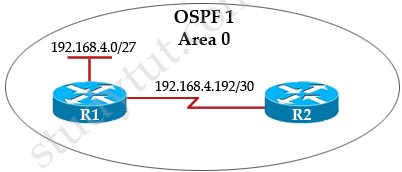
Which OSPF commands should be configured on R1 to enable OSPF?
A.
router ospf 1
network 192.168.0.0 area 0
B.
router ospf 1
network 192.168.4.0 0.0.0.31 area 0
C. router ospf 1
network 192.168.4.0 0.0.0.31 area 0
network 192.168.4.192 0.0.0.3 area 0
D. router ospf 1
network 192.168.4.0 0.0.0.31 area 0
network 192.168.4.192 0.0.0.0 area 0
Answer: C
Explanation
The subnets in “network …” statements under OSPF process should cover all the interfaces’ IP addresses so that OSPF can run on all interfaces of the router. In this case the “network 192.168.4.0 0.0.0.31 area 0” statement covers the IP address 192.168.4.0/27 and the “network 192.168.4.192 0.0.0.3 area 0” statement covers the IP address 192.168.4.192/30.
Question
What is the default Layer 2 encapsulation protocol used on a synchronous serial interface of a Cisco router?
A. Frame Relay
B. PPP
C. HDLC
D. CHAP
E. PAP
Answer: C
Explanation
The default serial encapsulation on Cisco routers is Cisco HDLC, so it does not need to be explicitly configured on the router. As a result, the encapsulation type is not displayed in the configuration.
Note: Cisco HDLC (also known as cHDLC) is an extension to the High-Level Data Link Control network protocol created by Cisco
Question
Which of the following commands can be used to check the network statements which were used with OSPF?
A. show ip ospf interface
B. show ip route
C. show ip ospf neighbor
D. show ip protocols
Answer: D
Explanation
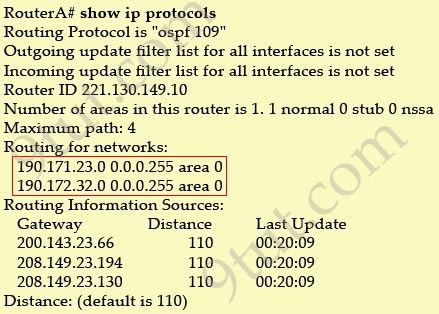
The “show ip protocols” can be used to check the network statements used under OSPF process. For example, if we use these commands:
| router ospf 109 network 190.171.23.0 0.0.0.255 area 0 network 190.172.32.0 0.0.0.255 area 0 |
Then we can see these networks under “Routing for networks” field of the “show ip protocols” command: