Trunking Questions
Question
Which two commands must be configured under an interface of a Cisco switch which supports both ISL and 802.1Q to carry all VLANs to a Cisco 2960 switch? (Choose two)
A. Switch(config-if)#switchport mode access
B. Switch(config-if)#switchport mode both
C. Switch(config-if)#switchport mode trunk
D. Switch(config-if)#switchport trunk encapsulation dot1q
Answer: C D
Explanation
ISL and 802.1Q are two types of encapsulation that are used to carry data from multiple VLANs over trunk links. The Cisco 2950, 2960 switches do not support ISL encapsulation so we only need to use the single command “switchport mode trunk” to configure trunking. But Cisco 3550, 3560 switches do support both ISL and 802.1Q trunking so we have to use two commands “switchport trunk encapsulation dot1q” (to choose 802.1Q encapsulation protocol) and “switchport mode trunk” (to set trunking).
For your information, the Cisco Catalyst 4500/4000 series switches do not support ISL while the Cisco Catalyst 6500/6000 series support both ISL and 802.1Q.
Question
Two switches are connecting via their Fa0/5 interfaces using crossover cable. Switch1 is receiving this error:
| %SPANTREE-7-RECV_1Q_NON_TRUNK: Received 802.1Q BPDU on non trunk FastEthernet0/5 VLAN1. %SPANTREE-7-BLOCK_PORT_TYPE: Blocking FastEthernet0/5 on VLAN0001. Inconsistent port type. |
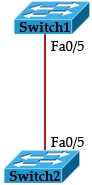
What is the reason of this error?
A. One of the two ports is shut down
B. Fa0/5 on Switch1 is configured as an access port while Fa0/5 on Switch2 is configured as a trunk port.
C. The trunking modes on two switches are mismatched
D. Switch1 is running Spanning Tree Protocol while Swich2 is not.
E. There is an access-list on Switch1 that drops all BPDU packets
Answer: B
Explanation
Switch1 received the error “Received 802.1Q BPDU on non trunk FastEthernet0/5 VLAN1” that means Fa0/5 on Switch1 is not a trunk port -> it is configured as an access port.
Question
Which of the following protocol should be configured between two switches in order to send traffic from multiple VLANs?
A. Spanning Tree Protocol
B. VLAN Trunking Protocol
C. IEEE 802.1Q
D. DHCP
E. ARP
Answer: C
Explanation
802.1Q (and ISL) are two types of encapsulation that are used to carry data from multiple VLANs over trunk links.
Question
An networking engineer issued the following commands on a Cisco switch but an error occurred.
Switch(config)# interface fastethernet 0/1
Switch(config-if)# switchport mode trunk
Command rejected: An interface whose trunk encapsulation is “Auto” can not be configured to “trunk” mode.
What was the reason of this problem?
A. Trunking is not supported on this switch
B. We must set the mode to “auto” first
C. The encapsulation type must be set to 802.1q first
D. The command “no switch mode auto” must be issued first
Answer: C
Explanation
The error occurs when the switch supports both IEEE 802.1Q and ISL encapsulations. In this switch you must choose which trunking encapsulation should be used first before setting it into “trunk” (with “switchport mode trunk” command). To choose trunking encapsulation method, use the “switchport trunk encapsulation {isl | dot1q}” command).
Question
Refer to the exhibit.
What will be the result of the configuration shown below.
| Switch1(config)#interface fa0/5 Switch1(config-if)#switchport trunk encapsulation dot1q Switch1(config-if)#switch mode trunk Switch1(config-if)#switchport trunk native vlan 5 |
Switch2(config)#interface fa0/5 Switch2(config-if)#switchport trunk encapsulation isl Switch2(config-if)#switch mode trunk Switch2(config-if)#switchport trunk native vlan 5 |
A. The link between two switches can operate normally
B. The link between two switches can still operate but only traffic for VLAN 5 can pass through
C. The link between two switches can still operate except traffic for VLAN 5
D. The link is down and no traffic can pass through
Answer: D
Explanation
The trunking encapsulation on two interfaces are not matched (one is set to “dot1q” while the other is set to “isl”) so the link is down and no traffic can pass through.
Question
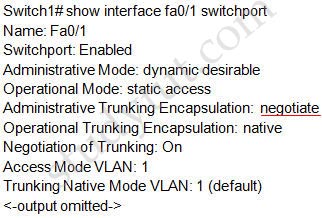
Check the output below. What can be said about setting the “Administrative Trunking Encapsulation” to “negotiate”?
A. This switch only supports IEEE 802.1Q trunking
B. This switch supports both IEEE 802.1Q and ISL trunking
C. This port can operate in trunking mode or access mode
D. This switch only supports ISL trunking
Answer: B
Explanation
The Administrative Trunking Encapsulation is set to “negotiate” means this switch supports both IEEE 802.1Q and ISL. If the switch only supports 802.1Q or it is set to 802.1Q, it will show “Administrative Trunking Encapsulation: dot1q”.