VLAN Questions
Question 1
Which network device should you use to divide a network into VLANs?
A. router
B. switch
C. bridge
D. hub
E. transceiver
Answer: B
Explanation
Switch is the most popular networking device used to divide a network into multiple Virtual Local Area Networks (VLANs). Each VLAN can be considered a separate broadcast domain.
Question 2
Which of the following statements are correct about VLANs? (Choose two)
A. It defines a collision domain
B. It defines a broadcast domain
C. A Layer 2 device is required to route between VLANs
D. A Layer 3 device is required to route between VLANs
Answer: B D
Explanation
A VLAN can be considered a separate broadcast domain as a host in a VLAN can only send packets to other hosts in the same VLAN through a Layer 2 switch. Broadcasts can also be sent in the same VLAN of the originating host. For example in the picture below, PC2 can only communicate to PC4, PC1 can only communicate to PC3:
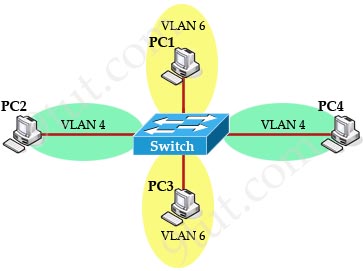
Note: To communicate with hosts in another VLAN, a Layer 3 device (like a router) must be used.
Question 3
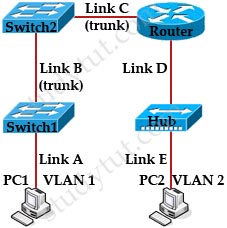
PC1 is communicating with PC2. On which links will a VLAN ID tag be included in the frame?
A. LinkA, LinkB, LinkC, LinkD, LinkE
B. LinkA, LinkE
C. LinkB, LinkD
D. LinkA, LinkD
E. LinkB, LinkE
F. LinkB, LinkC
Answer: F
Explanation
The important thing to remember is switch only tags a VLAN ID when it is going to send to a trunk link. And a trunk link is usually the link connecting two switches. A switch will remove the VLAN ID tag before sending to an access link. In this case the trunk links are the links between Switch 1, Switch 2 and the Router (Link B and C). The link between Switch2 and the Router is configured as a trunk link (at Switch2 side) for InterVLAN routing.
Question 4
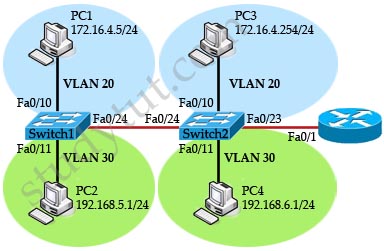
Checking the topology below. Why does PC2 cannot communicate with PC4 in the same VLAN?
A. Subinterfaces should be configured on the router
B. Interface Fa0/23 of Switch2 should configured as a trunk link
C. The IP address assignment on PC4 is not correct
D. The link between two switches must be configured as a trunk link
Answer: C
Explanation
Although PC2 and PC4 is in the same VLAN but they are not in the same subnet so they cannot communicate with each other.