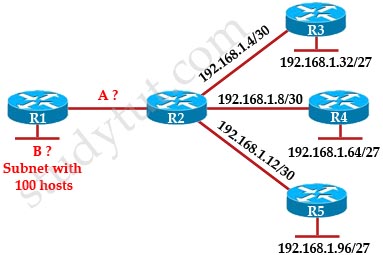
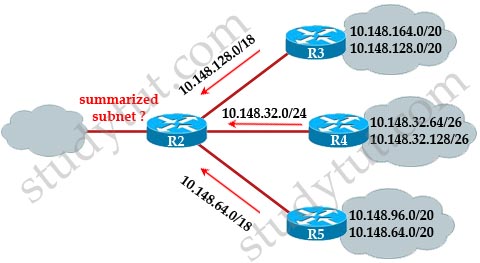
Author Archive

EIGRP Questions

November 13th, 2015

Question 1

Which single command should be used to check:

+ the IP address of the EIGRP neighbor
+ the retransmit interface and queue counts of adjacent routers

A. show ip eigrp topology
B. show ip eigrp database
C. show ip eigrp neighbors
D. show ip eigrp topology all-links


Answer: C

Explanation

Below is an example of the show ip eigrp neighbors command. The retransmit interval (Smooth Round Trip Timer – SRTT) and the queue counts (Q count, which shows the number of queued EIGRP packets) for the adjacent routers are listed:

EIGRP_show_ip_eigrp_neighbors_command.jpg

Question 2

Check the topology and output below. Which of the following statement is correct for the traffic from 172.16.1.192/26 to 10.10.10.0/30?

<Redraw>
A. Traffic will be load balanced on two direction
B. Traffic only goes through the R1
C. Traffic only goes through the R2
D. Traffic will be dropped


Answer: A

Question 3

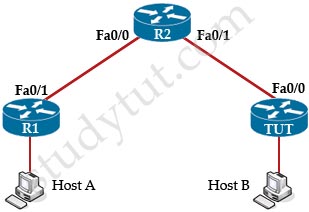
Check the topology below. R1 cannot exchange routing updates with other routers. What can be done to fix this problem?

A. Issue the “no shutdown” command on the Serial interface
B. Change the AS number on TUT to 120
C. The Serial connection must be set to Broadcast
D. All routers must use the same subnet masks so that they can see each other


Answer: B

Question 4

A colleague is studying about EIGRP. He wants to know what a feasible successor is and where it is stored. What will you explain to him?

A. It is a primary route, which is stored in the FIB
B. It is a primary route, which is stored in the topology table
C. It is a primary route, which is stored in the routing table
D. It is a backup route, which is stored in the FIB
E. It is a backup route, which is stored in the topology table
F. It is a backup route, which is stored in the routing table


Answer: E

Question 5

Your company is running EIGRP on their network. Check the topology below. If TUT router wants to send packets to 172.16.1.64/26, which path will it choose?

<Redraw>

A. To Chicago router
B. To Mexico router
C. The traffic will be load balanced
D. The traffic will be dropped

Answer: A

OSPF Questions 2

November 10th, 2015

Question 1

R1 and R2 are on the same segment but cannot establish OSPF neighbor relationship. What is the most likely problem?

OSPF_Neighbor_Issue.jpg

A. Two routers are using different process identifier
B. The hello and dead timers are mismatched on two routers
C. Two routers are configured in different areas
D. The costs on connected interfaces are mismatched


Answer: B C

Explanation

A is not correct because configure EIGRP on these routers (with a lower administrative distance) will force these routers to run EIGRP, not OSPF.

B is not correct because the backbone area of OSPF is always Area 0.

C and D are correct because these entries must match on neighboring routers:

Hello and dead intervals
Area ID (Area 0 in this case)
– Authentication password
– Stub area flag

Question 2

What parameter OSPF uses to calculate cost in Cisco devices?

A. MTU
B. Load
C. Bandwidth
D. Load and MTU
E. Delay and MTU
F. Bandwitdh and Delay


Answer: C

Explanation

The well-known formula to calculate OSPF cost is

Cost = 108 / Bandwidth

so C is the correct answer.

Question 3

<Redraw – Add picture>

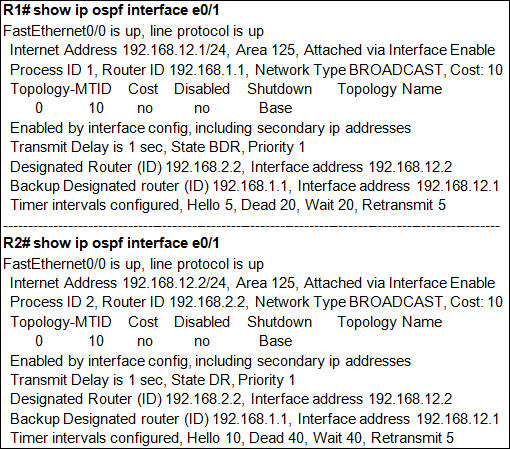
A technician configured OSPF on two routers but they cannot become neighbors. You are invited to troubleshoot the problem. After issuing the “show ip ospf interface Fa0/0” command can you tell where the problem is?

show_ip_ospf_interface_e0_1.jpg

A. The OSPF process ID is mismatched
B. The hello and dead timers are mismatched
C. Two routers cannot form OSPF neighbor relationship with network type “Broadcast”
D. The IP addresses on two routers are not in the same subnet
E. The priority of two interfaces must not greater than 1


Answer: B

Explanation

B is correct because these entries must match on neighboring routers:

Hello and dead intervals
Area ID (Area 0 in this case)
– Authentication password
– Stub area flag

In this case Ethernet0 of R1 has Hello and Dead Intervals of 5 and 20 while R2 has Hello and Dead Intervals of 10 and 40 -> R1 and R2 cannot form OSPF neighbor relationship.

Question 4

How can a link-state protocol build its topology table? (Choose two)

A. from routing tables of other routers
B. from hello messages
C. from LSAs sent from other routers
D. from special multicast packets
E. from broadcast messages from other routers


Answer: B C

Question 5

What command allows you to view the collection of link-states in OSPF?

A. show ip ospf database
B. show ip ospf
C. show ip ospf neighbors
D. show ip route ospf


Answer: C

Question 6

Check the topology below. Which of the following statement would be the cause of an OSPF router not form adjacency with another OSPF router? (Choose two)

OSPF_Neigbor_Problem.jpg

A. Interfaces S0/1 on two routers are configured in different areas
B. Static routing between two S0/1 interfaces need to be configured
C. The OSPF process ID on two routers need to be the same
D. The hello and dead timers on two routers are not the same


Answer: D

Explanation

To form an adjacency (become neighbor), router TUT & HQ must have the same Hello interval, Dead interval and AREA number.

Question 7

Which of the following statements are correct about the router-id in OSPF? (Choose three)

A. It is used to synchronize OSPF databases between routers
B. It is chosen randomly from the loopback and physical interfaces on the router
C. It is chosen from the highest IP address of the loopback interfaces
D. OSPF LSA Type 1 uses router-id to announce its presence
E. It is a 32-bit number


Answer: C D E

Explanation

OSPF LSA Type 1 (or Router LSA) is generated by all routers in an area to describe their directly attached links. An example below shows this type of LSA:

show_ip_ospf_database.jpg

As you can see, the LSA Type 1 uses the router ID to advertise itself (1.1.1.1 or 2.2.2.2).

The Router ID (RID) is an IP address used to identify the router and is chosen using the following sequence:
+ The highest IP address assigned to a loopback (logical) interface.
+ If a loopback interface is not defined, the highest IP address of all active router’s physical interfaces will be chosen.
+ The router ID can be manually assigned

Question 8

Your company is running OSPF using only area 0. What are advantages of using only one area? (Choose two)

A. The types of LSAs that are sent and received are reduced
B. Increase the speed of transmission
C. increase the speed of convergence
D. reduce routing overhead because of fewer packets need to be processed
E. decrease the number of routers need to be used
F. No virtual-link is needed because of a single area


Answer: A F

Question 9

What command should you use to enable OSPF on all interfaces of a router?

A.
Router(config)#router ospf 1
Router(config-router)#network all
B.
Router(config)#router ospf 1
Router(config-router)#network 255.255.255.255 255.255.255.255 area 0
C.
Router(config)#router ospf 1
Router(config-router)#network 0.0.0.0 0.0.0.0 area 0
D.
Router(config)#router ospf 1
Router(config-router)#network 0.0.0.0 255.255.255.255 area 0


Answer: D

OSPF Questions

November 10th, 2015

Question 1

What characteristics do a link-state routing protocol have? (Choose three)

A. Each node has a common map of the whole topology
B. Each node advertises full routing table with other neighbors
C. Use shortest path algorithm
D. send updates periodically
E. send updates on changes only


Answer: A C E

Question 2

Which of the following statements are correct about OSPF? (Choose three)

A. It uses Dijkstra algorithm
B. It uses Diffusing Update (DUAL) algorithm
C. It supports VLSM
D. It uses bandwidth to calculate cost
E. It uses hop count to calculate cost


Answer: A C D

Question 3

A technician has configured a new router into OSPF domain with the following commands:

R1(config)#router ospf 100
R1(config-router)#network 192.168.1.0 255.255.255.0 area 0
But 192.168.1.0/24 network do not appear in the routing table of other OSPF routers. What caused this problem?

A. OSPF process number is mismatched
B. OSPF area number is mismatched
C. The wildcard mask is wrongly configured
D. The network is wrongly configured
E. The interface must be turned on


Answer: C

Question 4

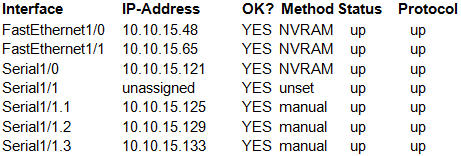
Check the output shown below of TUT router with the “show ip interface brief” command.

show_ip_int_brief.jpg

A technician enter the following commands:

TUT_Router(config)#router ospf 1
TUT_Router(config-router)#network 10.10.15.64 0.0.0.63 area 0

Which interfaces will participate into OSPF process 1? (Choose three)

A. Fa1/0
B. Fa1/1
C. Serial1/0
D. Serial1/1.1
E. Serial1/1.2
F. Serial1/1.3


Answer: B C D

Explanation

The “network 10.10.15.64 0.0.0.63″ equals to network 10.10.15.64/26. This network has:
+ Increment: 64 (/26= 1111 1111.1111 1111.1111 1111.1100 0000)
+ Network address: 10.10.15.64
+ Broadcast address: 10.10.15.127
Therefore all interface in the range of this network will join OSPF -> B C D are correct.

Question 5

What is the maximum number of equal-cost paths to the same destination that OSPF can install in the IP routing table by default?

A. 2
B. 6
C. 4
D. 8
E. 16


Answer: C

Explanation

The default number of equal-cost paths that can be placed into the routing of a Cisco OSPF router is 4. We can change this default value by using “maximum-paths” command:

Router(config-router)#maximum-paths 2

Note: Cisco routers support up to 6 equal-cost paths

Question 6

Which of the following statements are correct about OSPF process identifier?

A. There is only one OSPF process identifier that can be configured on a router
B. Many OSPF process identifiers can be configured on a router. Each runs a separate OSPF process
C. The process identifier is advertised to other OSPF routers in hello packets
D. The range of OSPF process identifier is from 1 to 65,535
E. OSPF routers must run the same process number to form neighbor relationship


Answer: B D

Question 7

What are the advantages of hierarchical design in OSPF topologies? (Choose three)

A. mitigate the instability to one area when there is a change in the topology
B. increase the speed of convergence
C. increase the speed of transmission
D. areas help reduce routing overhead because of fewer packets need to be processed
E. decrease the number of routers need to be used


Answer: A B D

Explanation

Hierarchical design of OSPF (basically means that you can separate the larger internetwork into smaller internetworks called areas) helps us create a network with all features listed above (decrease routing overhead, speed up convergence, confine network instability to single areas of the network).

Question 8

Which of the following commands should be used to advertise network 10.10.1.0/24 with OSPF? (Choose two)

A. router ospf 45
B. router ospf
C. router ip ospf
D. network 10.10.1.0/24 area 0
E. network 10.10.1.0 subnet-mask 255.255.255.0 area 0
F. network 10.10.1.0 0.0.0.255 area 0


Answer: A F

Explanation

In the router ospf command, the OSPF process ID ranges from 1 to 65535 -> A is correct

Question 9

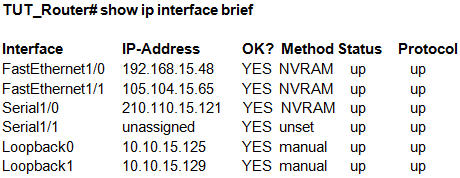
Check the output below. Which IP will be chosen as the OSPF router ID if the router ID was not assigned manually?

show_ip_int_brief_router_id.jpg

A. 192.168.15.48
B. 210.110.15.121
C. 10.10.15.125
D. 10.10.15.129


Answer: D

Explanation

The highest IP address of all loopback interfaces will be chosen -> Loopback1 will be chosen as the router ID.

Question 10

A colleague wants to know about the default administrative distance of OSPF. What will you answer her?

A. 120
B. 110
C. 90
D. 20
E. 1
F. 10


Answer: B

NAT/PAT Questions

November 10th, 2015

Question 1

A technician is configuring a static NAT. Which of the following statements are correct?

A. a static NAT always exists in the NAT table
B. hosts from outside cannot initiate the connection
C. hosts from outside can initiate the connection
D. static NAT does not need to configure inside and outside NAT interfaces


Answer: A B

Explanation

With static NAT, translations exist in the NAT translation table as soon as you configure static NAT command(s), and they remain in the translation table until you delete the static NAT command(s) -> A is correct.

With dynamic NAT, translations do not exist in the NAT table until the router receives traffic that requires translation. Dynamic translations have a timeout period after which they are purged from the translation table.

Because static NAT translations are always present in the NAT table so outside hosts can initiate the connection without being dropped -> B is correct, C is not correct.

Static translations can not be configured with access lists. To configure static NAT, we only need to specify source IP, NAT IP, inside interface & outside interface.

We have to specify which is the inside and outside interface -> D is not correct.

For your information, below is an example of configuring static NAT:

R0(config)#int f0/0
R0(config-if)#ip nat inside

R0(config-if)#int f0/1
R0(config-if)#ip nat outside

R0(config)#ip nat inside source static 10.0.0.1 200.0.0.2

(Reference: http://www.cisco.com/en/US/tech/tk648/tk361/technologies_tech_note09186a0080093f31.shtml)

Question 2

A colleague is asking why he should implement NAT to his network. What will you tell him about NAT? (Choose two)

A. NAT increases network security as inside networks are not advertised to outside
B. NAT does not alter the packets before sending them to the outside
C. With NAT configured, hosts do not need to reassign IP address for access from outside
D. NAT replaces the original MAC addresses with a predefined MAC address
E. NAT increases the routing speed


Answer: A C

Explanation

By not reveal the internal IP addresses, NAT adds some security to the inside network -> A is correct.

NAT has to modify the source IP addresses in the packets -> B is not correct.

By allocating specific public IP addresses to inside hosts, NAT eliminates the need to re-address the inside hosts -> C is correct.

NAT only alters the source IP address, not the MAC addresses -> D is not correct.

NAT does not increase the routing speed. In fact NAT reduces the routing speed as it needs to proceed the IP addresses in the packets.

Question 3

Which of the following statements is correct about the command “ip nat inside source list 50 interface serial0/1 overload”?

A. The configuration is missing a pool for NAT
B. There is not enough public IP addresses to allocate for inside hosts
C. Number 50 is the access-list number
D. The keyword “overload” in the ip nat inside source command allow 1:1 IP translation


Answer: C

Explanation

The “list 50″ refers to the access-list number 50.

Frame Relay 2

November 10th, 2015

Question 1

Which of the following statements about Frame Relay Point-to-Point subinterfaces are correct? (Choose two)

A. Each subinterface requires a different subnet
B. Point-to-Point subinterfaces work similarly to lease lines
C. Split-horizon issues need to be addressed
D. Before implementing dynamic routing protocols, they must be set to NBMA media
E. They are used in full mesh topologies


Answer: A B

Question 2

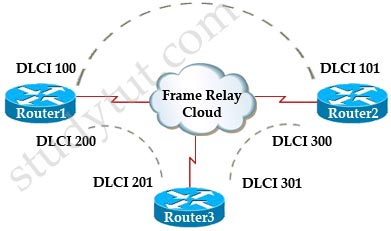
Which of the following assignments of DLCIs and IP addresses for the point-to-point Frame Relay is correct?

Frame_Relay_DLCI.jpg

<Redraw 16->100;17->200;99-> 60;28->30>
A.
DLCI 100: 172.16.100.1/24
DLCI 200: 172.16.100.2/24
DLCI 101: 172.16.100.3/24
DLCI 201: 172.16.100.4/24
B.
DLCI 100: 172.16.100.1/24
DLCI 200: 172.16.101.2/24
DLCI 101: 172.16.102.3/24
DLCI 201: 172.16.103.4/24
C.
DLCI 100: 172.16.100.1/24
DLCI 200: 172.16.101.2/24
DLCI 101: 172.16.100.3/24
DLCI 201: 172.16.101.4/24
D.
DLCI 100: 172.16.100.1/24
DLCI 200: 172.16.100.2/24
DLCI 101: 172.16.100.3/24
DLCI 201: 172.16.101.4/24


Answer: C

Question 3

A colleague asks what you can learn from the output of the “show frame-relay map” command. What will you answer him? (Choose two)

A. The local DLCI number
B. The IP address of the router
C. The transmission rate of the interface
D. The status of the Frame Relay link configured on the router
E. The number of errors occurred on the Frame Relay link


Answer: A D

Explanation

An example of the output of this command is shown below:

Frame_Relay_R0_show_frame-relay_map.jpg

From the output we can see the local DLCI (102 & 103) and the status of the PVC configured on the router (both are defined, active).

Question 4

Your company is using a Serial connection to communicate to a branch via PPP. But now your company is planning to replace PPP with Frame Relay. What should be re-configured for this replacement? (Choose three)

A. configure a static frame relay map on each subinterface
B. delete the IP address on the main physical interface
C. Create subinterfaces for each Frame Relay connection
D. Each subinterface must be configured with a different subnet
E. Set the encapsulation on each subinterface to Frame Relay


Answer: B C D

Explanation

To configure subinterface for Frame Relay, first we have to remove the IP address from the physical interface and choose a Frame Relay encapsulation. An example of configuring Frame Relay on a subinterface is shown below:

interface Serial0/1.12 point-to-point
 ip address 10.1.1.2 255.255.255.252
 frame-relay interface-dlci 304

Question 5

What are Frame Relay encapsulation types supported in Cisco routers? (Choose two)

A. Cisco
B. 802.3d
C. IETF
D. LMI
E. BECN


Answer: A C

Explanation

Cisco supports two Frame Relay encapsulation types: the Cisco encapsulation and the IETF Frame Relay encapsulation, which is in conformance with RFC 1490 and RFC 2427. The former is often used to connect two Cisco routers while the latter is used to connect a Cisco router to a non-Cisco router. You can test with your Cisco router when typing the command Router(config-if)#encapsulation frame-relay ? on a WAN link. Below is the output of this command (notice Cisco is the default encapsulation so it is not listed here, just press Enter to use it).

Frame_Relay_encapsulation_type.jpg

Note: Three LMI options are supported by Cisco routers are ansi, Cisco, and Q933a. They represent the ANSI Annex D, Cisco, and ITU Q933-A (Annex A) LMI types, respectively.

HDLC is a WAN protocol same as Frame-Relay and PPP so it is not a Frame Relay encapsulation type.

Question 6

What is the meaning of the “frame-relay map ip 10.0.0.1 103 broadcast” interface command?

A. inform other Frame Relay routers in the network to use DLCI 103 to send traffic to 10.0.0.1
B. broadcast the IP 10.0.0.1 to all Frame Relay neighbors
C. DLCI 103 should be used for all data sent from 10.0.0.1
D. DLCI 103 should be used for all data sent to 10.0.0.1


Answer: D

Frame Relay

November 9th, 2015

Question 1

What does the line “PVC STATUS = INACTIVE” mean in the “show frame-relay pvc” command?

A. There is a problem on the remote end of the PVC
B. There is a problem on the local end of the PVC
C. The interface which is configured with Frame Relay is shutdown
D. The PVC is waiting for the hello message from the remote end
E. The PVC is sending hello message but it does not receive response from remote end


Answer: A

Explanation

The PVC STATUS displays the status of the PVC. The DCE device creates and sends the report to the DTE devices. There are 4 statuses:

+ ACTIVE: the PVC is operational and can transmit data
+ INACTIVE: the connection from the local router to the switch is working, but the connection to the remote router is not available
+ DELETED: the PVC is not present and no LMI information is being received from the Frame Relay switch
+ STATIC: the Local Management Interface (LMI) mechanism on the interface is disabled (by using the “no keepalive” command). This status is rarely seen so it is ignored in some books.

Question 2

Which of the following commands check the encapsulation type for a frame relay connection?

A. show ip interface
B. show frame-relay lmi
C. show frame-relay pvc
D. show frame-relay map
E. show interfaces
F. show frame-relay status


Answer: D

Explanation

The “show frame-relay map” command displays the current map entries and information about the connections, including encapsulation type.

You can check Table 33 in the following link: http://www.cisco.com/en/US/docs/ios/12_2/wan/command/reference/wrffr4.html#wp1029343

It clearly states there is a Field which can be Cisco or IETF, which indicates “the encapsulation type” for the frame relay connection. We quote Table 33 here for your quick reference (you will see what we want to imply in bold):

Field Description
Serial 1 (administratively down) Identifies a Frame Relay interface and its status (up or down).
ip 131.108.177.177 Destination IP address.
dlci 177 (0xB1,0x2C10)     
DLCI that identifies the logical connection being used to reach this interface. This value is displayed in three ways: its decimal value (177), its hexadecimal value (0xB1), and its value as it would appear on the wire (0x2C10).
static Indicates whether this is a static or dynamic entry.
CISCO Indicates the encapsulation type for this map; either CISCO or IETF.
TCP/IP Header Compression (inherited), passive (inherited) Indicates whether the TCP/IP header compression characteristics were inherited from the interface or were explicitly configured for the IP map.

The “show frame-relay lmi” gives us information about the LMI encapsulation type used by the Frame Relay interface, which can be ANSI, CISCO or Q933a.

Question 3

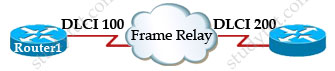
A colleague shows you a topology and asks what is the meaning of DLCI 200 in this case?

Frame_Relay_DLCI.jpg

A. It is the identifier of the PVC for both ends
B. It is a Layer 2 address used by Router1 to describe a PVC to Router3
C. B. It is a Layer 2 address used by Router3 to describe a PVC to Router1
D. It is a Layer 3 address used by the Router1 to describe a PVC to Router3
E. It is a random number that is shared among the frame-relay router in the network


Answer: B

Explanation

DLCI stands for Data Link Connection Identifier. DLCI values are used on Frame Relay interfaces to distinguish between different virtual circuits. DLCIs have local significance because the identifier references the point between the local router and the local Frame Relay switch to which the DLCI is connected.

Question 4

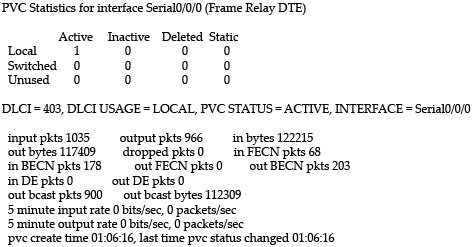
Check the output of the “show frame-relay pvc” command below.

Frame_Relay_show_frame-relay_map_pvc.jpg

What parameter in the output of the “show frame relay pvc” command indicates that traffic sent to the local router is congested?

A. in FECN pkts 68
B. in BECN pkts 203
C. PVC STATUS = ACTIVE
D. DE pkts 0


Answer: B

Explanation

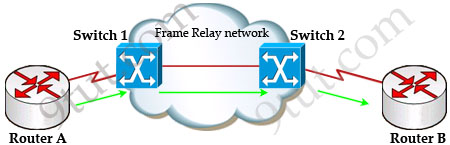
First we should grasp the concept of BECN & FECN through an example:

BECN_FECN.jpg

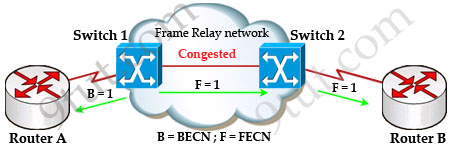
Suppose Router A wants to send data to Router B through a Frame Relay network. If the network is congested, Switch 1 (a DCE device) will set the FECN bit value of that frame to 1, indicating that frame experienced congestion in the path from source to destination. This frame is forwarded to Switch 2 and to Router B (with the FECN bit = 1).

Switch 1 knows that the network is congesting so it also sends frames back to Router A with BECN bit set to 1 to inform that path through the network is congested.

BECN_FECN_2.jpg

In general, BECN is used on frames traveling away from the congested area to warn source devices that congestion has occurred on that path while FECN is used to alert receiving devices if the frame experiences congestion.

BECN also informs the transmitting devices to slow down the traffic a bit until the network returns to normal state.

The question asks what “indicates that traffic sent to the local router is congested” which means it asks about the returned parameter which indicates congestion -> BECN.

Question 5

What will happen in a Frame Relay circuit if the Committed information rate (CIR) is exceeded?

A. All exceeded data is dropped
B. All exceeded data is marked discard eligible
C. Only exceeded UDP data is dropped while exceeded TCP data is allowed to go through
D. The frame relay device sends back a BECN message to warning the sending device to reduce the transmission speed


Answer: B

Explanation

Committed information rate (CIR): The minimum guaranteed data transfer rate agreed to by the Frame Relay switch. Frames that are sent in excess of the CIR are marked as discard eligible (DE) which means they can be dropped if the congestion occurs within the Frame Relay network.

Note: In the Frame Relay frame format, there is a bit called Discard eligible (DE) bit that is used to identify frames that are first to be dropped when the CIR is exceeded.

Question 6

Which of the following commands can be used to find out the DLCI destination address in a Frame Relay connection?

A. show frame-relay pvc
B. show frame-relay lmi
C. show frame-relay map
D. show frame-relay point-to-point
E. show ip frame-relay


Answer: C

Question 7

DLCI_map_statement.jpgR1 cannot communicate with R2. What is wrong with the below configuration:

R1#show running-config
interface Serial1/0
 bandwidth 52
 ip address 192.168.10.2 255.255.255.0
 encapsulation frame-relay
 frame-relay map ip 192.168.10.2 100 broadcast

A. wrong frame-relay map statement
B. wrong IP address
C. wrong bandwidth
D. wrong encapsulation type


Answer: A

Explanation

The IP address in the “frame-relay map ip …” command should be the IP address of the next-hop frame-relay router, not the local one.

Question 8

Check the output of the “show frame-relay map” below. A colleague asks you what the word “dynamic” here means. What will you answer here?

R1#show frame-relay map
Serial1/0/0(up): ip 192.168.1.1 dlci 403(0x193,0x6430), dynamic
    broadcast, status defined, active

A. The IP address 192.168.1.1 was learned dynamically
B. The DLCI 403 was generated dynamically
C. The mapping between DLCI 403 and IP address 192.168.1.1 was learned dynamically via Inverse ARP
D. Both the IP address and DLCI number were learned dynamically from remote router


Answer: C

Explanation

The term dynamic indicates that the DLCI number and the remote router IP address 192.168.1.1 are learned via the Inverse ARP process.

Inverse ARP is a technique by which dynamic mappings are constructed in a network, allowing a device such as a router to locate the logical network address and associate it with a permanent virtual circuit (PVC).

Question 9

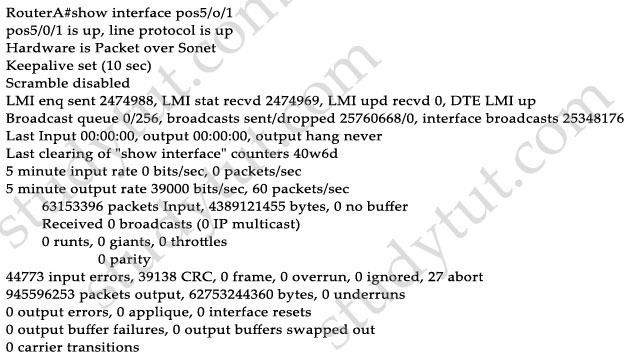
Check the output of the “show interface pos5/0/1” command. Which WAN technology is running on this interface?

show_interface_pos.jpg

A. PPP
B. Frame-relay
C. HDLC
D. TDM
E. ISDN


Answer: B

Explanation

Local Management Interface (LMI) is a signaling standard protocol used between your router (DTE) and the first Frame Relay switch. From the output we learn this interface is sending and receiving LMI messages -> Frame Relay is being used.

Question 10

What does the “broadcast” keyword in the “frame-relay map ip 192.168.100.1 100 broadcast” command mean?

A. The IP address 192.168.100.1 should be broadcasted to all Frame Relay devices at the other ends
B. The DLCI 100 should be broadcasted to all Frame Relay devices at the other ends
C. The broadcast keyword allows routing updates,such as RIP, EIGRP, OSPF, to be forwarded on the PVC
D. The mapping between IP address 192.168.100.1 and DLCI 100 will be advertised to all other Frame Relay devices


Answer: C

Explanation

The command frame-relay map ip 192.168.100.1 100 broadcast means to mapping the distal IP 192.168.100.1 to the local DLCI 100. When the “broadcast” keyword is included, it turns Frame Relay network as a broadcast network, which can forward broadcasts.

IP Routing 2

November 7th, 2015

Question 1

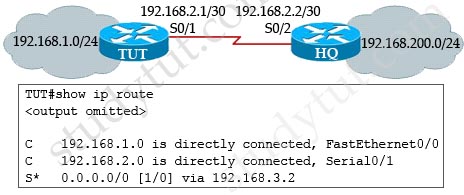
You have just received a report that your users on 192.168.1.0 cannot get resources on the server at 192.168.200.0. You are now accessing TUT router to perform some check with the show ip route command. This is the output:

show_ip_route_troubleshooting.jpg

Based on the output, what is the root of this issue?

A. TCP/IP is not implemented on TUT router
B. The Serial connection between the two routers is having problem
C. An incorrect static route has been configured on TUT router
D. Router HQ does not know how to reply users on 192.168.1.0
E. TUT router is missing “ip routing” command
F. TUT router did not recognize its neighbor


Answer: C

Explanation

From the last line “S* 0.0.0.0/0 [1/0] via 192.168.3.2” we can see that the destination of the default route configured on TUT router is 192.168.3.2. Therefore if TUT router receives a packet with destination IP address of 192.168.200.0/24, it will use this default route (because no other entries are matched) and sends the packet to 192.168.3.2 while it should be 192.168.2.2 (IP address of S0/2 of HQ router).

Question 2

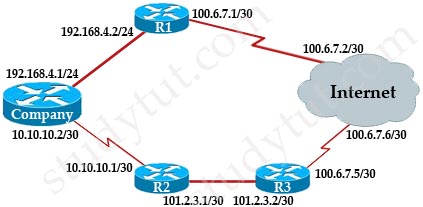
Check the topology below.

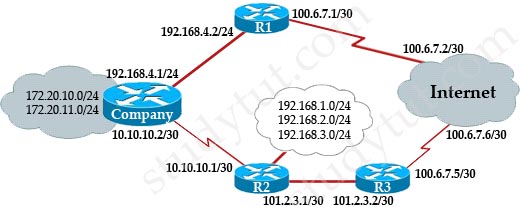
best_route_internet.jpg

Your company hired two Internet connections to increase availability as shown in the topology. You are tasked to configure a route to the Internet for users on the Company LAN via the most direct path. The speed of serial link is E1 and the speed of Ethernet link is 100Mbps. What command will you use to complete this task?

A. ip route 0.0.0.0 0.0.0.255 192.168.4.2
B. ip route 0.0.0.0 0.0.0.0 192.168.4.2
C. ip route 0.0.0.0 255.255.255.255 10.10.10.1
D. ip route 0.0.0.0 0.0.0.0 10.10.10.1
E. ip route 0.0.0.0 0.0.0.0 10.10.10.2
F. ip route 0.0.0.0 255.255.255.255 10.10.10.2


Answer: B

Explanation

“The most direct path” here means via R1 because it is directly connected with the Internet while the R2 path needs to go through R3. So we need a command to send traffic to R2 and the correct command is “ip route 0.0.0.0 0.0.0.0 192.168.4.2″.

Question 3

Your colleague is hesitating in choosing between static or dynamic routing. What will you tell him about the benefits of static routing over dynamic routing?

A. The routing table will be updated automatically when network topology changes
B. Increase network security as only the administrator of that router can alter the routing table
C. Reduce complexity of configuration when the network topology grows
D. Static routing will be sent automatically to other routers in the same network
E. Reduce routing updates and traffic load in stub networks


Answer: B E

Explanation

By using static routing, your router does not have information about the entire networks so it is safer and increase security for the network. Also static routing requires all entries in the routing table must be configured manually by the networking administrator.

Another advantage of static routing is that it does not require routing updates (which are very important for dynamic routing to learn the topology). Therefore it can reduce routing updates in a router. Especially, static routing is often used in stub router (the router that only has one exit point to outside) to reduce unnecessary routing updates.

Question 4

Which of the following paths will the router choose to send a packet with destination IP of 192.168.100.130?

A. 192.168.100.0/24 via 10.1.1.1, 00:00:29, Serial1/0
B. 192.168.100.128/25 via 10.1.2.1, 00:00:29, Serial1/1
C. 192.168.100.128/26 via 10.1.3.1, 00:00:29, Serial1/2
D. 192.168.100.128/27 via 10.1.4.1, 00:00:29, Serial1/3


Answer: D

Explanation

The destination IP address 10.1.5.65 belongs to all four answers (192.168.100.0/24, 192.168.100.128/25, 192.168.100.128/26 & 192.168.100.128/27 subnets but the “longest prefix match” algorithm will choose the most specific subnet mask -> the prefix “/27″ will be chosen to route the packet. Therefore the next-hop should be 10.1.4.1 -> D is correct.

Question 5

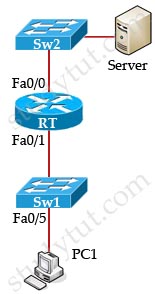
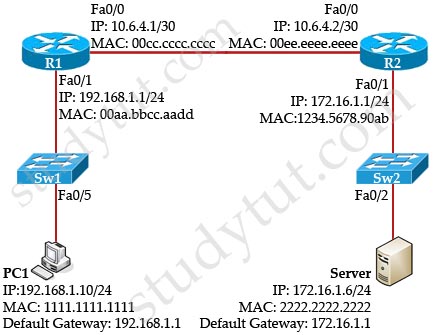
What destination addresses PC1 will use to send traffic to Server?

Source_MAC.jpgA. the IP address of Fa0/0 of the router
B. the IP address of Fa0/1 of the router
C. the IP address of Server
D. the MAC address of Server
E. the MAC address of Fa0/0 of the router
F. the MAC address of Fa0/1 of the router


Answer: C F

Explanation

While transferring data through many different networks, the source and destination IP addresses are not changed. Only the source and destination MAC addresses are changed. So in this case PC1 will use the IP address of Server and the MAC address of Fa0/1 interface to send data. When the router receives this data, it replaces the source MAC address with it own Fa0/0 interface’s MAC address and replaces the destination MAC address with Server’s MAC address before sending to Server -> C and F are correct.

Question 6

Check the topology below

best_route_internet_2.jpg

What is the simplest way to establish a route so that users in Company can send data to users in R2?

A. Configure OSPF on Company router to advertise routes to R2 router
B. Configure EIGRP on R2 router to advertise routes to Company router
C. Configure a dynamic routing protocol and inject a default route on R2 router to advertise that route to Company router
D. Configure a static route on Company router to send all traffic destined for 192.168.0.0/22 to 10.10.10.1
E. Configure a static route on R2 router to send all traffic destined for 172.20.1.0/23 to Company router


Answer: D

Question 7

Your network is using one static routing protocol and one dynamic routing protocol to reach a network. How can you influence the router to prefer dynamic to static routing protocol?

A. By bandwidth
B. By cost
C. By administrative distance
D. By MTU
E. By delay


Answer: C

Explanation

By default, static routing protocol has lower administrative distance than dynamic routing protocol so routers always prefers using static routing protocol. To change this behavior we have to increase the administrative distance of the static routing protocol (to a higher value than that of the dynamic routing protocol). For example, we can increase the value of administrative distance of a static route to 100 by this command:

Router(config)#ip route 10.0.0.0 255.255.255.0 15.1.1.1 100

Question 8

Check the topology below.

ARP_cache.jpg

After PC1 pings Server, what entry will be put in the ARP cache of PC1 for this communication? (Choose two)

A. Interface Address: 192.168.1.1
B. Interface Address: 10.6.4.2
C. Interface Address: 172.16.1.6
D. Physical Address: 00aa.bbcc.aadd
E. Physical Address: 1234.5678.90ab
F. Physical Address: 2222.2222.2222


Answer: A D

Explanation

PC1 knows Server is in another network so it will send the pings to its default gateway 192.168.1.1. PC1 sends a broadcast frame asking the MAC address of 192.168.1.1. These information (IP and MAC address of the default gateway) is saved in its ARP cache for later use.

Question

Which of the following statements are correct about the command “ip route 192.168.1.0 255.255.255.0 10.10.10.1”? (Choose two)

A. All traffic on the router is sent to the destination IP address 10.10.10.1
B. Traffic destined for network 192.168.1.0/24 is routed to 10.10.10.1
C. Traffic destined for 10.10.10.1 is routed to the 192.168.1.0/24 network
D. This static route uses default administrative distance


Answer: B D

IP Routing

November 6th, 2015

Question 1

If a router has multiple sources to reach the destination, which of the following paths will it choose to send the packets?

A. From an OSPF update
B. From a static configured route
C. From an EIGRP update
D. From a RIP update
E. From a directly connected interface with an IP address in the same subnet with the destination
F. From a default route


Answer: E

Question 2

Check the topology below, PC1 and the Server is communicating. What will the source MAC address of the packet PC1 receive from the Server?

Source_MAC.jpg

A. the MAC address of PC1
B. the MAC address of Server
C. the MAC address of Fa0/0 interface of the Router
D. the MAC address of Fa0/1 interface of the Router


Answer: D

Question 3

A router has learned about a destination via multiple routing protocols. Which routing protocol will the router use to reach the destination?

A. OSPF
B. EIGRP
C. RIPv2
D. RIPv1
E. The router will load balance the traffic among these routing protocols
F. OSPF and EIGRP


Answer: B

Explanation

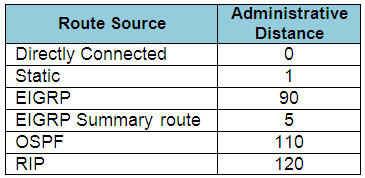
When one route is advertised by more than one routing protocol, the router will choose to use the routing protocol which has lowest Administrative Distance. The Administrative Distances of popular routing protocols are listed below:

Administrative Distances_popular_routing_protocols.jpg

Question 4

Check the topology below

staic_routing_config.jpg

Your company wants to configure a static route to network 192.168.1.0/24 on TUT router. What command will you use to complete this task? (Choose two)

A. TUT(config)#ip route 192.168.1.0 0.0.0.255 Serial0/1
B. TUT(config)#ip route 192.168.1.0 255.255.255.0 Serial0/1
C. TUT(config)#ip route 192.168.1.0 0.0.0.255 Serial0/2
D. TUT(config)#ip route 192.168.1.0 255.255.255.0 Serial0/2
E. TUT(config)#ip route 192.168.1.0 255.255.255.0 192.168.2.1
F. TUT(config)#ip route 192.168.1.0 255.255.255.0 192.168.2.2


Answer: B F

Explanation

The simple syntax of static route:

ip route destination-network-address subnet-mask {next-hop-IP-address | exit-interface}
+ destination-network-address: destination network address of the remote network
+ subnet mask: subnet mask of the destination network
+ next-hop-IP-address: the IP address of the receiving interface on the next-hop router
+ exit-interface: the local interface of this router where the packets will go out

In the statement “ip route 192.168.1.0 255.255.255.0 Serial0/1″:

+ 192.168.1.0 255.255.255.0: the destination network
+ Serial0/1: the exit-interface

Question 5

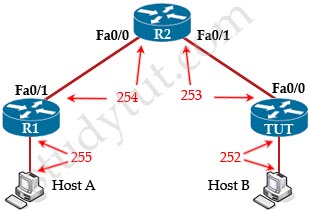
A host is pinging interface s0/0 on TUT router, what is the TTL of the ping when it reach this interface?

ping_TTL.jpg

A. 255
B. 254
C. 253
D. 252
E. 251


Answer: C

Explanation

From the CCNA ICND2 Exam book: “Routers decrement the TTL by 1 every time they forward a packet; if a router decrements the TTL to 0, it throws away the packet. This prevents packets from rotating forever”. For example in the topology above, pings to S0/1 and S0/0 of Router 2 have the same TTL.

The picture below shows TTL values for each interface of each router and for Host B. Notice that Host A initializes ICMP packet with a TTL of 255:

ping_TTL_explain.jpg

Question 6

What commands are used to set the “gateway of last resort” to the current default gateway on a router, suppose that ip routing is enabled?

A. ip default-gateway 10.0.0.1
B. ip route 0.0.0.0 0.0.0.0 10.0.0.1
C. ip default-network 0.0.0.0
D. ip default-gateway 0.0.0.0
E. ip default-network 10.0.0.1


Answer: B C

Explanation

Please visit http://www.cisco.com/c/en/us/support/docs/ip/routing-information-protocol-rip/16448-default.html

Question 7

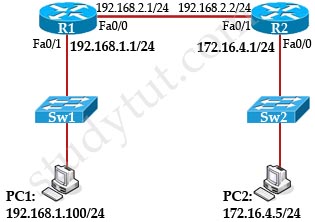
ping_host_unreachable.jpg

C:\> ping 172.16.4.5
Pinging 172.16.4.5 with 32 bytes of data:

Reply from 192.168.1.1: Destination host unreachable.
<output omitted>

PC1 is trying to ping PC2 and receives the result as shown below. What may cause this issue?

A. The port connecting to PC1 on Sw1 is shut down
B. The port connecting to R1 on Sw1 is shut down
C. Interface Fa0/1 on R1 is faulty
D. Interface Fa0/1 on R2 is shut down
E. PC1 is not using TCP/IP
F. R1 does not know how to reach PC1


Answer: D

Explanation

In this question, PC1 wants to ping PC2 but it receives a reply from the interface Fa0/1 of Router1 (192.168.1.1/24) that the “destination host unreachable”.

If the link between PC1 and Sw1 is down or the link between Sw1 and R1 is down then PC1 can not receive this reply -> A, B and F are not correct.

Interface Fa0/1 on R1 replies for the ping packets from Host1 so it is up (TCP/IP is running correctly) -> E is not correct. If the interface Fa0/1 on R1 is shutdown then we will receive a message of “Request timed out”, not “Destination host unreachable”.

Answer D is correct because we can get a reply from the interface Fa0/1 of R1 so the link between PC1 and R1 should be fine -> the problem lies at the other side of R1. But if the link between R2 and PC2 is down then we will receive a reply from interface Fa0/1 of R2 that the “destination host unreachable”. Therefore the problem can just be at the link between R1 and R2.

Question 8

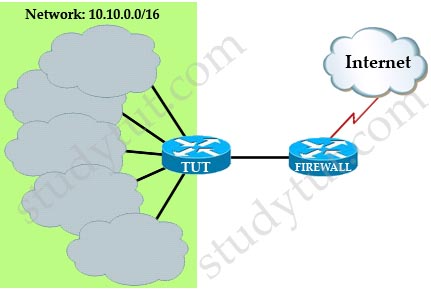
Checking the topology below.

static_routing_firewall.jpg

There are many subnets of the network 10.10.0.0/16 are implemented behind TUT router. What are the simplest configuration on the TUT and FIREWALL routers so that their routing tables are minimal and easy to understand? (Choose two)

A. Configure OSPF on FIREWALL router to advertise summarized routes to TUT router
B. Configure OSPF on TUT router to advertise summarized routes to FIREWALL router
C. Configure a default route on TUT router to send traffic to FIREWALL router
D. Configure a static route on FIREWALL router that sends all traffic to network 10.10.0.0/16 to TUT router
E. Configure OSPF on both routers so that they can learn all the subnets behind TUT router


Answer: C D

Subnetting Questions 2

November 6th, 2015

Question 1

Check the topology below.
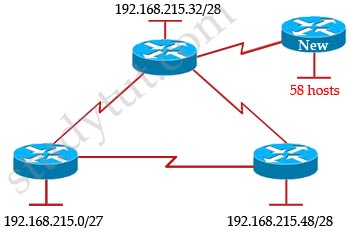
subnet_address.jpg

Your company has just added a new router and required a new subnet with 58 hosts. Which IP address range and subnet mask will you recommend your company to use to save addresses for other subnets?

A. 192.168.215.80/25
B. 192.168.215.80/26
C. 192.168.215.80/27
D. 192.168.215.80/28
E. 192.168.215.56/26


Answer: B

Explanation

58 hosts < 64 = 26 -> we need a subnet mask of at least 6 bit 0s -> “/26″. The question requires “save addresses for other subnets” which means we have to allow only 62 hosts-per-subnet -> B is correct.

Question 2
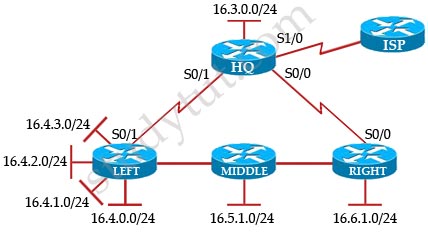
subnet_summarize.jpg

Your company has the network shown in the topology above. There are so many entries in the routing table of the HQ router so you are required so reduce its size. After investigation, you noticed the LEFT router has many subnets that can be summarized. Which entry in the routing table of HQ router shows the route summary for subnets of LEFT router without containing other subnets?

A. 16.0.0.0/20 is subnetted, 1 subnet
D  16.0.0.0[90/85384391] via 16.10.10.2 5w4d, Serial0/1

B. 16.0.0.0/21 is subnetted, 1 subnet
D  16.4.0.0[90/85384391] via 16.10.10.2 5w4d, Serial0/1

C. 16.0.0.0/22 is subnetted, 1 subnet
D  16.4.0.0[90/85384391] via 16.10.10.2 5w4d, Serial0/1

D. 16.0.0.0/23 is subnetted, 1 subnet
D  16.4.0.0[90/85384391] via 16.10.10.2 5w4d, Serial0/1

E. 16.0.0.0/24 is subnetted, 1 subnet
D  16.4.0.0[90/85384391] via 16.10.10.2 5w4d, Serial0/1

F. 16.0.0.0/20 is subnetted, 1 subnet
D  16.4.0.0[90/85384391] via 16.10.10.2 5w4d, Serial0/1


Answer: C

Explanation

All the above networks can be summarized to 16.0.0.0 network but the question requires to summarize “for subnets of LEFT router without containing other subnets” so we must summarized to 16.4.0.0 network. The LEFT router has 4 subnets so we need to “move left” 2 bits of “/24″-> /22 is the best choice -> C is correct.

Question 3

What is the best summarization for the routes below?
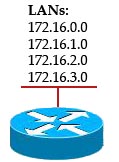
Summarize_LAN.jpg

A. 172.16.0.0/21
B. 172.16.0.0/22
C. 172.16.0.0/23
D. 172.16.0.0/24


Answer: B

Explanation

We need to summarize 4 subnets so we have to move left 2 bits (22 = 4). In this question we can guess the initial subnet mask is /24 because 172.16.0.0, 172.16.1.0, 172.16.2.0, 172.16.3.0 belong to different networks. So “/24″ moves left 2 bits -> /22.

Question 4

You are hired to design the network range for LAKE company. The company requires a minimum of 400 subnets and each subnet should have a minimum of 60 hosts. This company has been allocated a class B address. Which subnet mask will you recommend for the company?

A. 255.255.255.0
B. 255.255.255.128
C. 255.255.255.240
D. 255.255.128.0
E. 255.255.255.192
F. 255.255.128.0
G. 255.255.192.0


Answer: B E

Explanation

We need to remember the default subnet mask of class B is 255.255.0.0. Next, the company requires a minimum of 400 sub-networks so we have to use at least 512 sub-networks (because 512 is the minimum power of 2 and greater than 400). Therefore we need to get 9 bits for network mask (29=512), leaving 7 bits for hosts which is 27= 128 > 60 hosts per subnet.This scheme satisfies the requirement -> B is correct.
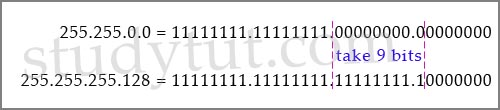
take9bits.jpg

We can increase the sub-networks to 1024 ( 1024 = 210), leaving 6 bits for hosts that is 26= 64 > 60 hosts. This scheme satisfies the requirement, too -> E is correct.
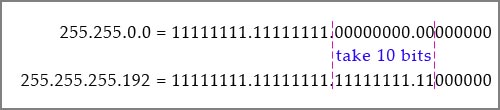
take10bits.jpg

Question 5

Which address range should you use to efficiently summary the routing table of TUT router?
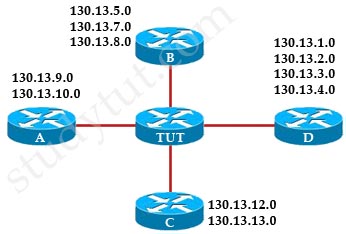
summarized_effective.jpg

A. 130.13.1.0/20
B. 130.13.8.0/20
C. 130.13.0.0/20
D. 130.13.0.0/22
E. 130.13.1.0/19
F. 130.13.0.0/21


Answer: C

Explanation

To summarize these networks efficiently we need to find out a network that “covers” from 130.13.1.0 -> 130.13.13.0 (including 13 networks < 16). So we need to use 4 bits (24 = 16). Notice that we have to move the borrowed bits to the left (not right) because we are summarizing.

The network 130.13.0.0 belongs to class B with a default subnet mask of /16 but in this case it has been subnetted with a subnet mask of /24 (we can guess because 130.13.1.0, 130.13.2.0, 130.13.3.0… are different networks).

Therefore “move 4 bits to the left” of “/24″ will give us “/20″ -> C is the correct answer.

Question 6

From the exhibit, could you describe the addressing scheme used in this network? (Choose three)
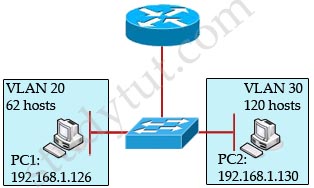
subnets_assignments.jpg

A. This network uses the subnet mask of 255.255.255.128
B. This network uses the subnet mask of 255.255.255.224
C. Host in VLAN 20 can be assigned the IP address 192.168.1.37
D. Host in VLAN 30 can be assigned the IP address 192.168.1.37
E. For different VLANs communication, the router must be configured with subinterfaces and multiple IP addresses
F. For different VLANs communication, the router must be configured with a single IP address


Answer: A C E

Explanation

First we should notice that different VLANs must use different sub-networks. In this case PC1 (192.168.1.126) and PC2 (192.168.1.130) are in different VLANs and must use different sub-networks. Therefore the subnet mask in use here should be 255.255.255.128. In particular, it is 192.168.1.0/25 with 2 sub-networks:

+ Sub-network 1: 192.168.1.0 -> 192.168.1.127 (assigned to VLAN 20)
+ Sub-network 2: 192.168.1.128 -> 192.168.1.255 (assigned to VLAN 30)

-> A is correct.

The IP address 192.168.1.37, which is in the same sub-network with PC1 so it can be assigned to VLAN 20 -> C is correct.

To make different VLANs communicate with each other we can configure sub-interfaces (with a different IP address on each interface) on the LAN interface of the router -> E is correct.

Question 7

You are required to divide a class C address block into seven LANs. What is the maximum number of usable host IP addresses per LAN if we do not use subnet 0?

A. 4
B. 14
C. 28
D. 30
E. 32
F. 60


Answer: D

Explanation

“You are required to divide a class C address block into seven LANs” means we have 7 subnets < 8 = 23, so we need to borrow 3 bits from the host part (to create 8 subnets). We are using class C address block which has 8 bits 0 (the default subnet mask of class C is 255.255.255.0), so the number of bit 0 left is 8 – 3 = 5. Therefore the hosts per subnet will be 25 – 2 = 30 -> D is correct.

Question 8

Check the topology below. What is the best subnet this router can summarize to advertise to another router?
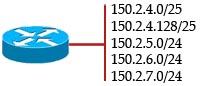
summarized_subnets.jpg

A. 150.2.0.0/22
B. 150.2.4.0/22
C. 150.2.0.128/22
D. 150.2.8.0/22
E. 150.2.4.0/23
F. 150.2.4.0/21


Answer: B

Explanation

Network 150.2.4.0/25 and network 150.2.4.128/25 can be grouped to a single network 150.2.4.0/24.

Network 150.2.4.0/24 + Network 150.2.5.0/24 + Network 150.2.6.0/24 + Network 150.2.7.0/24 can be grouped to a single network 150.2.4.0/22 because we have all 4 subnetworks so we can move left 2 bits (22=4).

Question 9

The below output is taken from a router with the “show ip route” command.

10.146.8.0/30 is subnetted, 4 subnets
D 10.146.8.16 [90/1823638] via 10.1.1.5, 00:00:04, Serial1/1
D 10.146.8.20 [90/2681856] via 10.1.1.5, 00:00:04, Serial1/1
D 10.146.8.24 [90/3837233] via 10.1.1.5, 00:00:04, Serial1/1
D 10.146.8.28 [90/8127323] via 10.1.1.5, 00:00:04, Serial1/1
C 10.146.8.4/30 is directly connected, Serial0/1

What is the best summarized address for the subnets learned by EIGRP?

A. 10.146.8.0/28
B. 10.146.8.16/28
C. 10.146.8.20/28
D. 10.146.8.16/27
E. 10.146.8.20/29
F. 10.146.8.0/27


Answer: B

Explanation

We have 4 routes learned by EIGRP:

D 10.146.8.16 [90/1823638] via 10.1.1.5, 00:00:04, Serial1/1
D 10.146.8.20 [90/2681856] via 10.1.1.5, 00:00:04, Serial1/1
D 10.146.8.24 [90/3837233] via 10.1.1.5, 00:00:04, Serial1/1
D 10.146.8.28 [90/8127323] via 10.1.1.5, 00:00:04, Serial1/1

These subnets are all /30 (as it says “10.146.8.0/30 is subnetted, 4 subnets”. We have 4 successive subnets = 22 so we can go back 2 bits -> the summarized subnet mask is 30 – 2 = 28 and the summarized network is 10.146.8.16/28.

Subnetting Questions 1

November 4th, 2015

Question 1

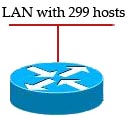
Subnetting_LAN.jpg

A router is connecting with a LAN department with 299 hosts. What subnet mask is best to cover all hosts in one subnet while leaving least amount of wasted hosts?

A. 255.255.255.0
B. 255.255.254.0
C. 255.255.252.0
D. 255.255.248.0


Answer: B

Explanation

299 hosts < 512 = 29 -> We need a subnet mask of 9 bits 0 -> 1111 1111.1111 1111.1111 1110.0000 0000 -> 255.255.254.0

Question 2

subnet_link.jpg

Check the topology below. Suppose “ip subnet-zero” command was issued on all routers. What subnets should you configure for the connection A and subnet B?

A. B – subnet 192.168.1.48/26
B. B – subnet 192.168.1.128/25
C. B – subnet 192.168.1.192/26
D. A – 192.168.1.0/30
E. A – 192.168.1.40/30
F. A – 192.168.1.112/30


Answer: B D

Explanation

Subnet B needs 100 hosts < 128 = 27 -> Need a subnet mask of 7 bit 0s -> “/25″.

Because the ip subnet-zero command is used, network 192.168.1.0/30 can be used.

Answer E “A – 192.168.1.40/30″ is not correct because this subnet belongs to R3 subnet (192.168.1.32/27).
Answer F “A – 192.168.1.112/30″ is not correct because this subnet belongs to R5 subnet (192.168.1.96/27).

Question 3

Which network and subnet mask allow three hosts to be on the same subnet while keeping the maximum number of subnets?

A. 192.168.12.0 255.255.255.252
B. 192.168.12.8 255.255.255.248
C. 192.168.12.8 255.255.255.240
D. 192.168.12.0 255.255.255.240
E. 192.168.12.32 255.255.255.224


Answer: B

Explanation

First we should observe the answers, they are all 192.168.12.x so they are in class C with a default subnet mask of 255.255.255.0. We need three web servers (three hosts) in a subnet so we need 3 bits 0 (using the formula 23 – 2 = 6 > 5 hosts) so the last octet of our subnet mask should be 1111 1000 -> 248.

Question 4

Which is the suitable subnet mask for a network to be subnetted into 8 subnets, each contains up to 28 hosts?

A. 0.0.0.224
B. 255.255.255.248
C. 255.255.255.240
D. 255.255.255.224
E. 255.255.255.128


Answer: D

Explanation

A is not correct because it is a wildcard mask (not subnet mask).

This question is a bit unclear but we can suppose we have to begin with default subnet mask and “subnet” it. And the default subnet mask here should be class C: 255.255.255.0

For answer B: 248 = 1111 1000 -> with this subnet mask we can subnet up to 25 = 32 subnets but only 23 – 2 = 6 hosts per subnet -> B is not correct.

For answer C: 240 = 1111 0000 -> with this subnet mask we can subnet up to 24 = 16 subnets but only 24 – 2 = 14 hosts per subnet -> C is not correct.

For answer E: 240 = 1111 0000 -> There are 24 = 16 subnets but only 24 – 2 = 14 hosts per subnet < 28 hosts -> E does not satisfy the second requirement (of 28 hosts per subnet).

For answer D: 224 = 1110 0000 -> There are 23 = 8 subnets and 25 – 2 = 30 hosts > 28 hosts -> This is the correct answer.

Question 5

Your company is using the network 192.168.10.8/29. You are required to manually assign the first usable IP for the router and the last usable IP for the FTP server. What will you enter into the IP box of the FTP server?

A.
IP: 192.168.10.14
Subnet mask: 255.255.255.248
Default Gateway: 192.168.10.10

B.
IP: 192.168.10.13
Subnet mask: 255.255.255.248
Default Gateway: 192.168.10.10

C.
IP: 192.168.10.14
Subnet mask: 255.255.255.248
Default Gateway: 192.168.10.9

D. IP: 192.168.10.14
Subnet mask: 255.255.255.240
Default Gateway: 192.168.10.10

E. IP: 192.168.10.15
Subnet mask: 255.255.255.240
Default Gateway: 192.168.10.10

F. IP: 192.168.10.15
Subnet mask: 255.255.255.248
Default Gateway: 192.168.10.9


Answer: A

Question 6

Check the topology below. After receiving all the subnets, what if the summarized subnet that R1 should send to R2?

summarize_subnet.jpg

A. 10.148.0.0/16
B. 10.148.0.0/20
C. 10.148.0.0/24
D. 10.32.0.0/16
E. 10.32.0.0/17
F. 10.64.0.0/16


Answer: A

Explanation

Router A receives 3 subnets: 10.148.64.0/18, 10.148.32.0/24 and 10.148.128.0/18.

All these 3 subnets have the same form of 10.148.x.x so our summarized subnet must be also in that form -> Only A, B or C is correct.

The smallest subnet mask of these 3 subnets is /18 so our summarized subnet must also have its subnet mask equal or smaller than /18.

-> Only answer A has these 2 conditions -> A is correct.

Question 7

Your company has just been assigned an address range 14.1.6.0/23. You are required to divide this range into the maximum number of subnets but each subnet can have as many as 30 hosts. What subnet mask you will suggest to them?

A. 14.1.6.0/25
B. 14.1.6.0/26
C. 14.1.6.0/27
D. 14.1.6.0/28
E. 14.1.6.0/29


Answer: C

Explanation

Each subnet has 30 hosts < 32 = 25 so we need a subnet mask which has at least 5 bits 0 -> /27. Also the question requires the maximum number of subnets (which minimum the number of hosts-per-subnet) so /27 is the best choice -> C is correct.

Question 8

What advantages does a hierarchical addressing network provide?

A. Reduces MAC address table size
B. Increase the speed of transmission
C. Reduces routing table size
D. The management and troubleshooting are simple


Answer: C D

Question 9

You are working in an Internet Service Provider (ISP) company. You are tasked to connect to 100 customers on point-to-point connections. Which initial IP and subnet mask you can use to complete this task while saving subnet and host addresses for future use?

A. 16.1.0.0/20 and subnetted with subnet mask of /30
B. 16.1.0.0/21 and subnetted with subnet mask of /30
C. 16.1.0.0/22 and subnetted with subnet mask of /30
D. 16.1.0.0/23 and subnetted with subnet mask of /30
E. 16.1.0.0/24 and subnetted with subnet mask of /30


Answer: D

Explanation

We need 100 point-to-point links which equal to 100 sub-networks < 128 so we need to borrow 7 bits (because 27 = 128).

The network used for point-to-point connection should be /30.
So our initial network should be 30 – 7 = 23.

So 16.1.0.0/23 is the correct answer.

You can understand it more clearly when writing it in binary form:

/23 = 1111 1111.1111 1110.0000 0000
/30 = 1111 1111.1111 1111.1111 1100 (borrow 7 bits)

Question 10

Find the network address of the subnet with an IP of 130.16.17.252 and subnet mask 255.255.240.0.

A. 130.16.16.0
B. 130.16.0.1
C. 130.16.32.0
D. 130.16.32.255
E. 130.16.64.0


Answer: A

Explanation

Increment: 16 (of the third octet)
Network address: 130.16.16.0

-> A is correct.